
Track
Associate Data Analyst in SQL
39 hr
REPLACE(string, old_substring, new_substring) swaps every occurrence of a substring in a single call
Chain calls to replace multiple substrings: REPLACE(REPLACE(col, 'a', 'b'), 'c', 'd')
Pass an empty string to remove characters: REPLACE(phone, '-', '')
If any argument is NULL, the function returns NULL for that row
Case sensitivity depends on your database and collation—SQL Server and MySQL default to case-insensitive; PostgreSQL defaults to case-sensitive
The REPLACE() function in SQL searches for the specified substring or string in a column and replaces it with another given string. The example below shows the basic use of the REPLACE() function. The arguments in the function include:
string: The original string where you are supposed to make the replacement.
old_substring: The substring to be replaced.
new_substring: The substring to replace the old one.
REPLACE(string, old_substring, new_substring)When using the REPLACE() function to alter the strings in a table, the query will have the following syntax, where:
column_name: The column used to search the substring occurrences.
old_substring: The substring to be replaced.
new_substring: The substring to replace the old one.
-- Select the description column from the products table,
-- replacing occurrences of 'old' with 'new'
SELECT
    REPLACE(column_name, 'old_substring', 'new_substring') AS updated_column
FROM
Products;The SQL REPLACE() function alters or substitutes all string occurrences with a specified substring or string. In the example below, the REPLACE() function in SQL has replaced the value old with new in the description column. The query will execute each row to replace the old string with a new one.
-- Select the description column from the products table,
-- replacing occurrences of 'old' with 'new'
SELECT
    REPLACE(description, 'old', 'new') AS updated_description
FROM
    Products;
Note: MySQL, PostgreSQL, Oracle, and SQL Server databases all support the REPLACE() function.
There are many important use cases of the SQL REPLACE() function in text manipulation and data transformation. They include the following:
You can use the SQL REPLACE() function to perform a basic replacement. Let's assume we have the following table in our SQL Server database:
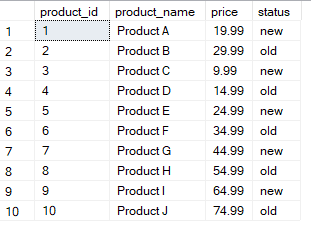 Products table example. Image by Author.
Using the following SQL query, you can use the REPLACE() function to change the old status to new.
SELECT
    product_id,
    product_name,
    price,
    REPLACE(status, 'old', 'new') AS updated_status
FROM Products;
The resulting table will look like the one shown below.
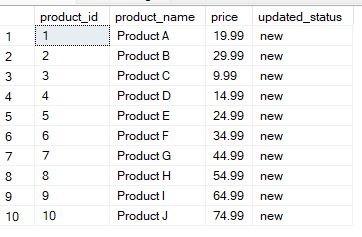
Table updated with SQL REPLACE(). Image by Author.
If you want to replace multiple substrings, use chained multiple REPLACE() functions. Here, we are updating the value old with outdated, and new with fresh.
-- Chain multiple REPLACE() functions to replace 'old' with 'outdated' and 'new' with 'fresh'
SELECT
    product_id,
    product_name,
    price,
    REPLACE(REPLACE(status, 'old', 'outdated'), 'new', 'fresh') AS updated_status
FROM Products;
The resulting table is shown below.
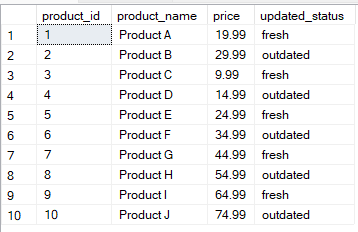
Table updated using multiple substrings. Image by Author.
Pass an empty string as the third argument to remove characters entirely. This is the cleanest way to strip punctuation, extra spaces, or formatting characters from a column.
-- Remove dashes from phone numbers
SELECT
    customer_id,
    REPLACE(phone_number, '-', '') AS clean_phone
FROM Customers;
For example, '555-867-5309' becomes '5558675309'. The same technique removes special characters, encoding artifacts, or unwanted whitespace from imported data.
Case sensitivity in REPLACE() depends on your database and collation. PostgreSQL treats it as case-sensitive by default, so REPLACE(col, 'Old', 'New') will not match 'old'. SQL Server and MySQL follow the collation of the column or database—most default installations use a case-insensitive collation, so REPLACE() will match regardless of case.
When you want to replace values that are not case-sensitive, you should use the UPPER() or LOWER() functions to convert the text before replacement. This technique keeps values consistent.
-- Replace 'OLD' with 'OUTDATED', handling case sensitivity by converting to upper case
SELECT
    product_id,
    product_name,
    price,
    REPLACE(UPPER(status), 'OLD', 'OUTDATED') AS updated_status
FROM Products;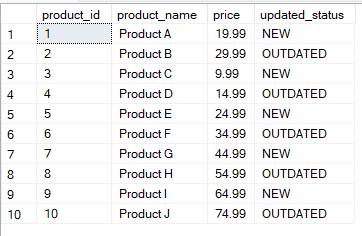
Table updated using the REPLACE() and UPPER() functions. Image by Author.
-- Replace 'old' with 'outdated', handling case sensitivity by converting to lowercase
SELECT
    product_id,
    product_name,
    price,
    REPLACE(LOWER(status), 'old', 'outdated') AS updated_status
FROM Products;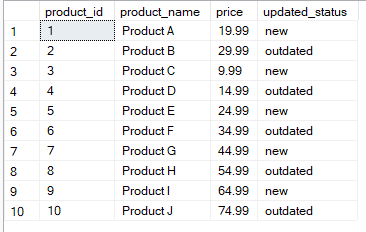
Table updated using the SQL REPLACE() and LOWER() functions. Image by Author.
These techniques combine REPLACE() with other SQL functions to handle substitutions that go beyond a simple find-and-swap.
The REPLACE() function can be used to perform dynamic replacements by using a combination of other SQL functions. For example, using the REPLACE() function, you can use the value of another column to replace the substring. In the example below, the REPLACE() function replaces each old product with the actual value from product_name.
-- Replace 'old' with the value from product_name column
SELECT
    product_id,
    product_name,
    price,
    REPLACE(status, 'old', product_name) AS updated_status
FROM Products;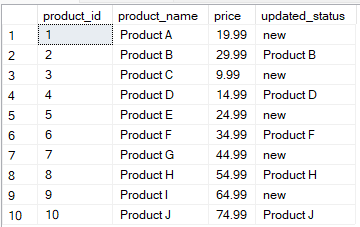
Table updated using REPLACE() function and dynamic values. Image by Author.
The SQL REPLACE() function works inside UPDATE statements to modify column values across one or more rows. The query below updates the value old with outdated in the status column.
-- Update the status column to replace 'old' with 'outdated'
UPDATE Products
SET status = REPLACE(status, 'old', 'outdated')
WHERE status LIKE '%old%';
For more complex scenarios, such as updating a table by joining it with another, see our tutorial on SQL UPDATE with JOIN.
One advanced technique is combining REPLACE() with other SQL string functions, such as CHARINDEX() or SUBSTRING(), when replacing string values.
-- Replace part of the product name starting from the first space with 'Updated'
SELECT
    product_id,
    product_name,
    price,
    -- Extract the substring of product_name starting from the first space to the end
    REPLACE(product_name, SUBSTRING(product_name, CHARINDEX(' ', product_name), LEN(product_name)), ' Updated') AS updated_product_name
FROM Products;
The resulting table from the above query is shown below.
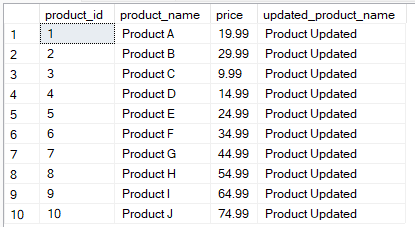
Table updated using REPLACE() and other string functions. Image by Author.
You can use the COALESCE() function to replace the NULL value with a fallback before calling REPLACE(), as shown below.
-- Replace NULL with 'new' in the status column
SELECT
    product_id,
    product_name,
    price,
    REPLACE(COALESCE(status, 'NULL'), 'NULL', 0) AS updated_status
FROM Products;
Pitfall: If any argument passed to REPLACE() is NULL, the function returns NULL for that row—even if the other arguments are valid. Wrap nullable columns in COALESCE() before calling REPLACE(), not after.
Here are the scenarios where REPLACE() earns its place in production queries.
Data cleaning: The REPLACE() function is useful for data cleaning, removing, and replacing unwanted characters or spaces in strings within a dataset.
Data transformation: The REPLACE() function is used in data transformation to change values into different formats and replace outdated values with new ones.
Handling user inputs: The REPLACE() function is important in adjusting and converting user input data to a uniform standard acceptable in a specific database. This technique helps in ensuring uniformity in the database.
Text standardization: The REPLACE() function standardizes values in string columns to ensure uniformity, such as abbreviations in lowercase or uppercase formats.
Conditional replacement: The REPLACE() function is also useful for easy database management practices to replace values according to specific rules.
MySQL, PostgreSQL, Oracle, and SQL Server databases all support the REPLACE() function in SQL, which has a similar syntax in these databases.
-- Replace 'old' with 'new' in the status column
SELECT
    product_id,
    product_name,
    price,
    REPLACE(status, 'old', 'new') AS updated_status
FROM Products;When using the REPLACE() function, it is important to note the following performance considerations and best practices.
The REPLACE() function may impact query performance, especially when handling large datasets. This issue occurs because the function updates the table for each row and may take a while for the query to execute.
Index the column you query against before running REPLACE() in a WHERE clause or UPDATE. Without an index, the database scans every row to find matches—especially costly on large tables.
To resolve the issues involved with query performance, it is important to consider the following best practices:
Use database profiling tools to monitor query performance and optimize when handling large datasets.
When using REPLACE() to modify the string values, maintain the indexes regularly to ensure they match.
Initiate batch processing to reduce query execution time when handling large datasets.
To learn other advanced SQL functions for data transformation, I recommend taking DataCamp’s Learn SQL course. The Reporting in SQL course also covers topics about database optimization, helping you learn the different techniques to optimize performance.
The REPLACE() function covers most text substitution needs across SQL databases. Keep NULL behavior in mind—any NULL argument returns NULL—and verify your database's collation settings when case sensitivity matters.
You can learn more about the REPLACE() function in SQL by taking DataCamp’s Intermediate SQL and SQL Fundamentals courses. I also recommend taking the Associate Data Analyst in SQL career track to learn more about SQL's applications in data transformation and jumpstart your career. Finally, I encourage you to take DataCamp’s SQL Associate Certification to help you showcase your professional achievement in using SQL for data analysis and stand out during job interviews.
Finally, if you are interested in learning more about various SQL functions used in data analysis, I recommend checking out some of my other tutorials, including:
Learn SQL with DataCamp
Track
Course
Course
Tutorial
Eugenia Anello
Tutorial
Travis Tang
Tutorial
Allan Ouko
Tutorial
Travis Tang
Tutorial
Allan Ouko
Tutorial
Travis Tang


